 XO Gallery
Beautiful galleries for Shopify. Built in minutes, updated by themselves.
Eight layouts, shoppable hotspots, and galleries that pull images straight from your products, collections or metafields. No code needed.
- Built for Shopify
- 4.9 out of 5 (163 reviews)
- Free plan available
- Serving merchants since 2018


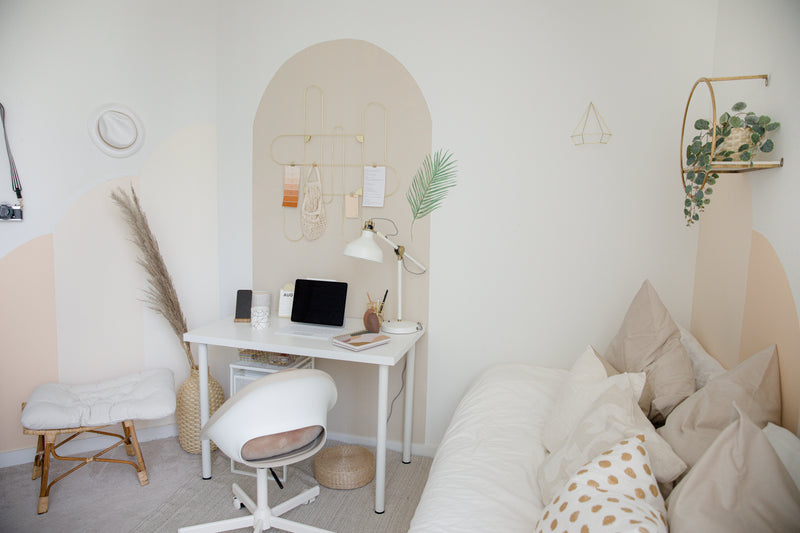






Same images, eight layouts. Switch any time without rebuilding the gallery.
Trusted by merchants who sell with images
- Fireclay Tile
- THE TARTAN ARTISAN
- TAIDEUX
- Future Design Homes
- DressMyNest
- valenti™ ORGANICS
One app, eight ways to show your images
Pick a layout, drop in your images, publish. Switch layout any time without rebuilding the gallery — use them as a collage, a portfolio, a row of images or a lightbox gallery.
Grid
Clean, even rows. The safe choice for product and portfolio pages.
Masonry
Mixed heights packed tight. Good when your images are not the same shape.
Stack
One image at a time, full attention. Built for storytelling.
Justified
Every row filled edge to edge, no gaps.
Carousel
Browse sideways with arrows or a swipe. Saves vertical space.
Slider
Full-width slides with optional thumbnails below.
Marquee
Images that scroll by on their own. A moving strip that catches the eye.
Album
Group many galleries behind cover photos. Your whole archive on one page.
Turn a lifestyle photo into a shopping cart
Tag products straight onto your image. A shopper clicks a hotspot, sees the product name, price and image, and adds it to the cart or goes to the product page. The photo does the selling.
Requires the Pro plan.
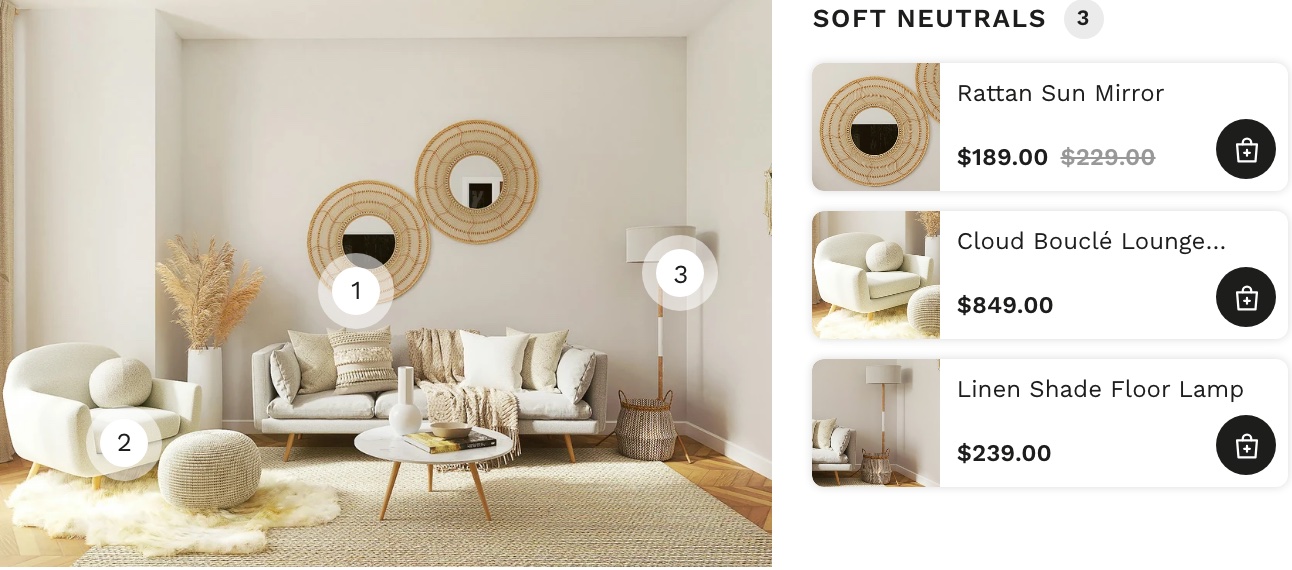
- Tag any product — from your catalogue, or link to any page you want.
- Place hotspots by hand — drag each point onto the item it belongs to.
- Choose how they look — numbered points, plain dots, or hidden points with a product panel instead.
- List every tagged productNew — next to the image, so shoppers see the whole look at a glance.
- Add to cart from the photoNew — one product at a time, or the whole look with a single "Add all to cart" button.
- Copy hotspots between images — when the same products come back in another photo.
Perfect for outfit shots, room sets, model photography and anything your customers see before they search for it.
Set it up once. It keeps itself up to date.
Most gallery apps make you rebuild a gallery every time your catalogue changes. XO Gallery reads your store instead.
One setup. A thousand pages. Nothing to maintain.
Product gallery
Replace the default image area on your product pages with a real gallery, in the layout you choose. Every product uses its own images automatically. Videos work too.
Metafield gallery New
Need different images on a thousand products, without a thousand galleries? Build one gallery, connect it to a Shopify metafield, then upload images on the product itself. The gallery follows.
Collection gallery New
Pull a collection into a gallery and let it change as you add or remove products.
Drag, drop, done
Build a gallery the way you would arrange photos on a table. Everything updates as you work, so you see the result before you publish.
- Live preview — change a setting, see it straight away. No save-and-reload loop.
- 37 hover effects — ready to use, plus your own with a few lines of CSS.
- A different effect per device — subtle on mobile, bold on desktop.
- Saved styles — for buttons and text, reused across every gallery.
- Duplicate a gallery — with all its settings, then change what you need.
- Import and export — a gallery to move it between your stores.
- Custom CSS — when you want full control.
Images, video, and a lot less clicking
- Bulk upload — add a whole shoot in one go.
- Import from a URL — paste a link, the image comes in.
- Upload your own video — MP4 and MOV, next to your images in the same gallery.View demo
- Or paste a YouTube or Vimeo link — and it plays in the lightbox.
- Control playback — autoplay, mute, loop, show or hide controls, and set your own poster frame.
- Unlimited galleries and unlimited images — on any paid plan.
- Albums — to keep hundreds of galleries tidy, with cover photos and a back button.
- File names become titles — automatically, if you want them to.
Make a big gallery easy to browse
A hundred images is only useful if a visitor can find the one they want.
- Filters — let visitors narrow a gallery by the tags you set, with a dropdown on mobile instead of a cramped row.View demo
- Search inside a gallery — by title, description or alt text — and search across galleries inside an album.View demo
- Load more — start light and load the rest on demand.View demo
- Full-screen lightbox — with zoom, captions and an optional share button.
- Open a gallery in a modal — from any button or link on your page.View demo
- Hover to swap — to a second image — the classic product trick.View demo
- Hide an image on one device — when it does not work on a small screen.
- Text animation — and captions that can link anywhere.View demo
Put a gallery anywhere in your store
Works with any Shopify theme. Change theme whenever you like — your galleries stay.
- Theme section — add XO Gallery as a section on your home page, a product page, a collection or a blog post, right inside the theme editor.
- Auto-publish a page — the app creates the page with your gallery already on it.
- Embed code — paste one snippet when you want exact placement.
- Page template — build a reusable gallery template and apply it to many pages.
Fast to load, easy for Google to read
Served from a CDN.
Your images are delivered through a content delivery network and optimised on the way, so a large gallery still loads fast — wherever your customer is.
Mobile first.
Images scale to every screen size and keep their animation. The lightbox included.
Only what is needed.
Lazy loading, a thumbnail size you choose, and nothing loaded before a visitor scrolls to it.
Found in Google Images.
XO Gallery adds ImageGallery structured data to your page, so search engines can read every image, its caption and its URL. You can also output real <img> tags instead of a placeholder, for the strongest indexing.
Built for Shopify.
The badge means the app meets Shopify's highest bar for speed, design and integration.
Start free
Try XO Gallery on a free plan with up to 12 images and four layouts — no card, no time limit.
Need unlimited galleries, video, all eight layouts and more than one language? Every paid plan comes with a 7-day free trial. Shoppable hotspots, product galleries and unlimited albums are on the Pro plan.
4.9 out of 5, from 163 reviews
“To say this gallery is superb would be an understatement. To say the support team is excellent would be an even bigger one. Hands down, it's the best gallery app I've found on Shopify.”
“XO Gallery was the perfect replacement — in fact it's absolutely brilliant. It's saved my website. Fast loading, beautiful effects, and the custom code lets you tailor galleries to your own needs.”
“Exactly what I needed to showcase customers and UGC all over my online store, and great customer support.”
Questions merchants ask
Can I try it before paying?
Yes. There is a free plan with no time limit, and every paid plan has a 7-day free trial.
Does it work with my theme?
Yes, with any Shopify theme. You can change theme as often as you like and your galleries stay.
How many galleries can I create?
Unlimited, on any paid plan.
Where can I put a gallery?
On any page: home, product, collection, blog post, or a page the app creates for you. Add it as a theme section or paste an embed code.
Can visitors filter the images?
Yes, on the Grid, Masonry, Stack and Justified layouts. Add a filter in Settings, then apply it to each image.
Can I make the gallery full width?
Yes, though the method depends on your theme. Email us and we will send you a template for yours.
Can I change the fonts and spacing?
Yes, with the built-in style settings, and with your own CSS when you want more.
What happens to my galleries if I uninstall?
We keep your data for 7 days, then delete it from our servers. Back up anything you need before you uninstall.